Zalith Launcher 2
A Minecraft: Java Edition Launcher for Android.
Zalith Launcher 2 brings Minecraft Java Edition to Android with cutting-edge features, modern design, and superior performance optimization for mobile gamers worldwide.
What is Zalith Launcher 2?
MovTery developed this open-source Minecraft Java Edition launcher called Zalith for Android users. You can customize your Minecraft gameplay on Android with the help of this launcher. With this launcher APK, you get amazing graphics options, full mod and shader support, and easy-to-use controls. It has been hosted on GitHub, where it has gained much support from the Android Minecraft player community, which shows that players love the complete Minecraft Java Edition experience on their mobile devices.
Zalith Launcher 2 has been built on PojavLauncher as its main engine. It gives many amazing features to the players, like customization options, gamepad support, and downloading of resource packs. The app has an easy-to-use interface and the latest design as it uses Jetpack Compose and Material Design 3.
Things to Know About Zalith Launcher 2
Latest Version: v2.1.2
What’s New
1. Language Updates: Languages are now synced with the Weblate translation project, which keeps the translations up to date.
2. Control Improvements:
- Joystick Support
- Added full joystick control support.
- You can now customize the joystick appearance.
- Control Layout Editor
- Joystick styles can now be configured independently.
- Button preview now shows only Normal and Pressed states.
- Button previews follow the selected appearance mode.
- Added a blocking overlay to prevent accidental actions when switching editor pages.
3. Version List Updates: Version list now supports new version numbering rules.
4. UI Changes: Settings page redesigned to match the Android 16 style.
5. Bug Fixes:
- Game Controls: Fixed missing default key values after changes in options.txt.
- Control Layout Editor: The editor now resets properly when you exit.
- Control Layouts: Layouts now reload in the background after saving.
6. Multiplayer: Fixed random crashes caused by incomplete account setup.
7. Input Method (IME): Added support for Baidu Input Method compatibility.
8. Downloads (CurseForge): Installations now stop correctly if an error occurs while reading mod URLs.
Minimum System Requirements
Key Features
Download Zalith Launcher 2 [Latest Version]

Zalith Launcher 2 || v2.1.2 || 247 MB
How to Download and Install Zalith Launcher 2 APK?
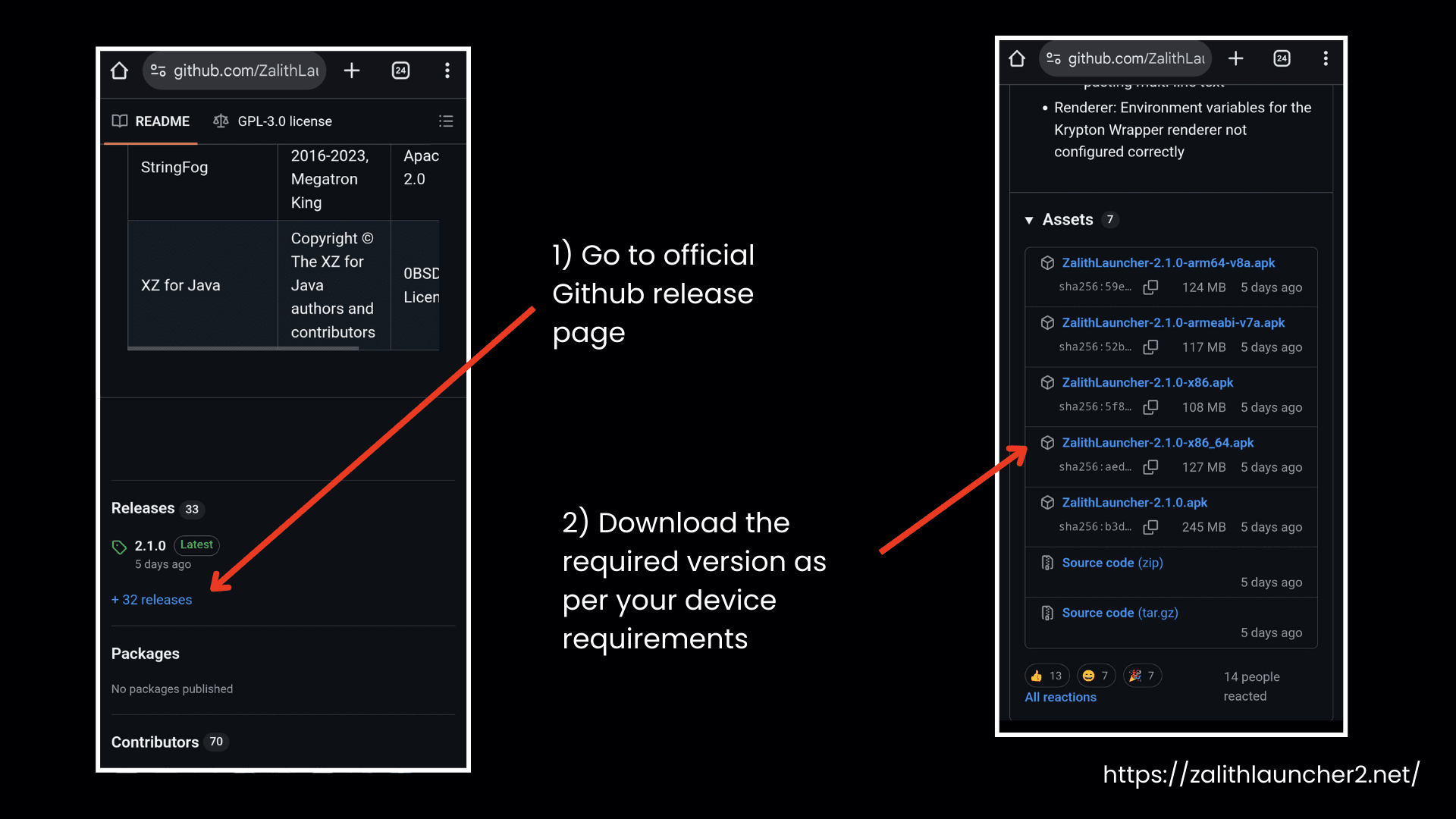
Download Zalith Launcher 2 APK from a trusted source so that you can have access to the full features of this launcher. This is an APK file, so it is not available on the Google Play Store. You can visit the Zalith Launcher 2 APK GitHub release page. The detailed steps to download it are as follows:
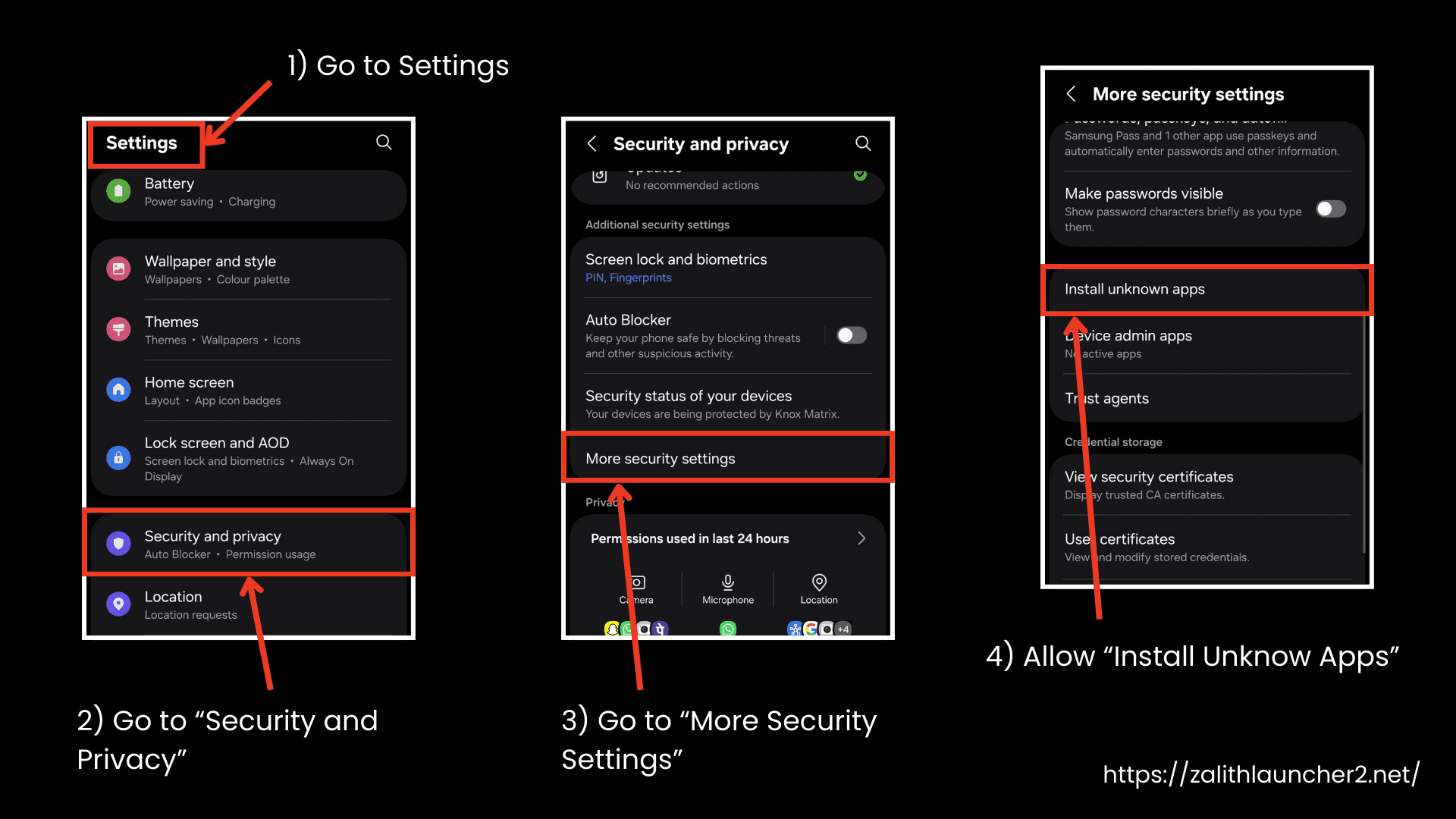
Step 1: Enable Unknown Sources
- First, go to the “Settings” of your Android device.
- Now go to Security or Privacy
- You need to enable “Install from Unknown Sources” or “Install Unknown Apps.”
- Before doing that, you should also allow your browser or file manager to install apps
Step 2: Download the APK File
- Now comes the download part. To avoid scams or malware, always download this APK file from a reliable source like our website or visit the official GitHub releases page.
- Then, click the link to download and wait for the download to complete.
Step 3: Install the Application
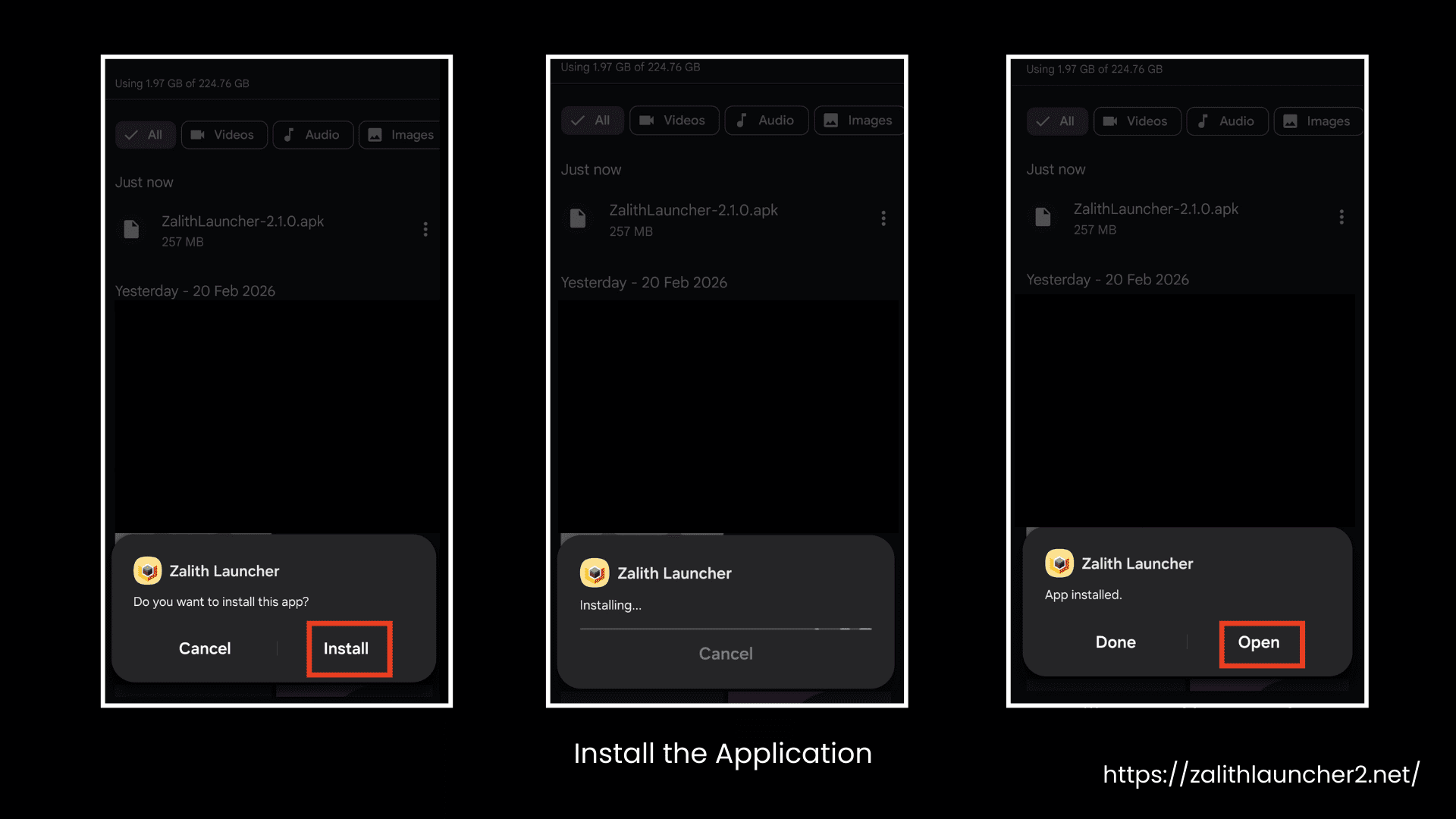
- Tap on the downloaded APK file to begin installation.
- Then click Install.
- It may take some time, so wait patiently.
Step 4: Grant Necessary Permissions
- Now, after it is completely installed, open it and allow the Storage permission when the app asks for access to your storage.
Step 5: Initial Setup
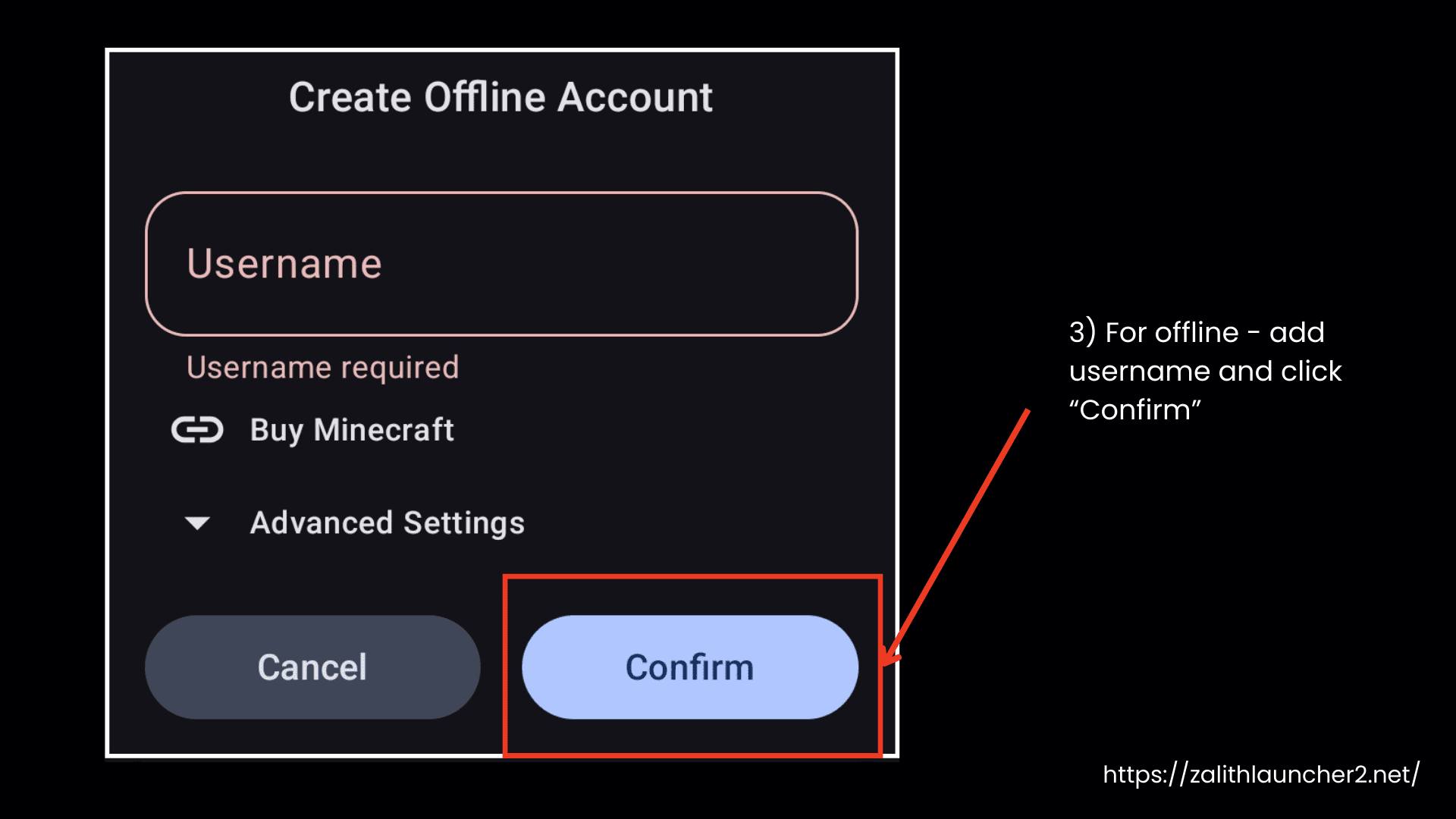
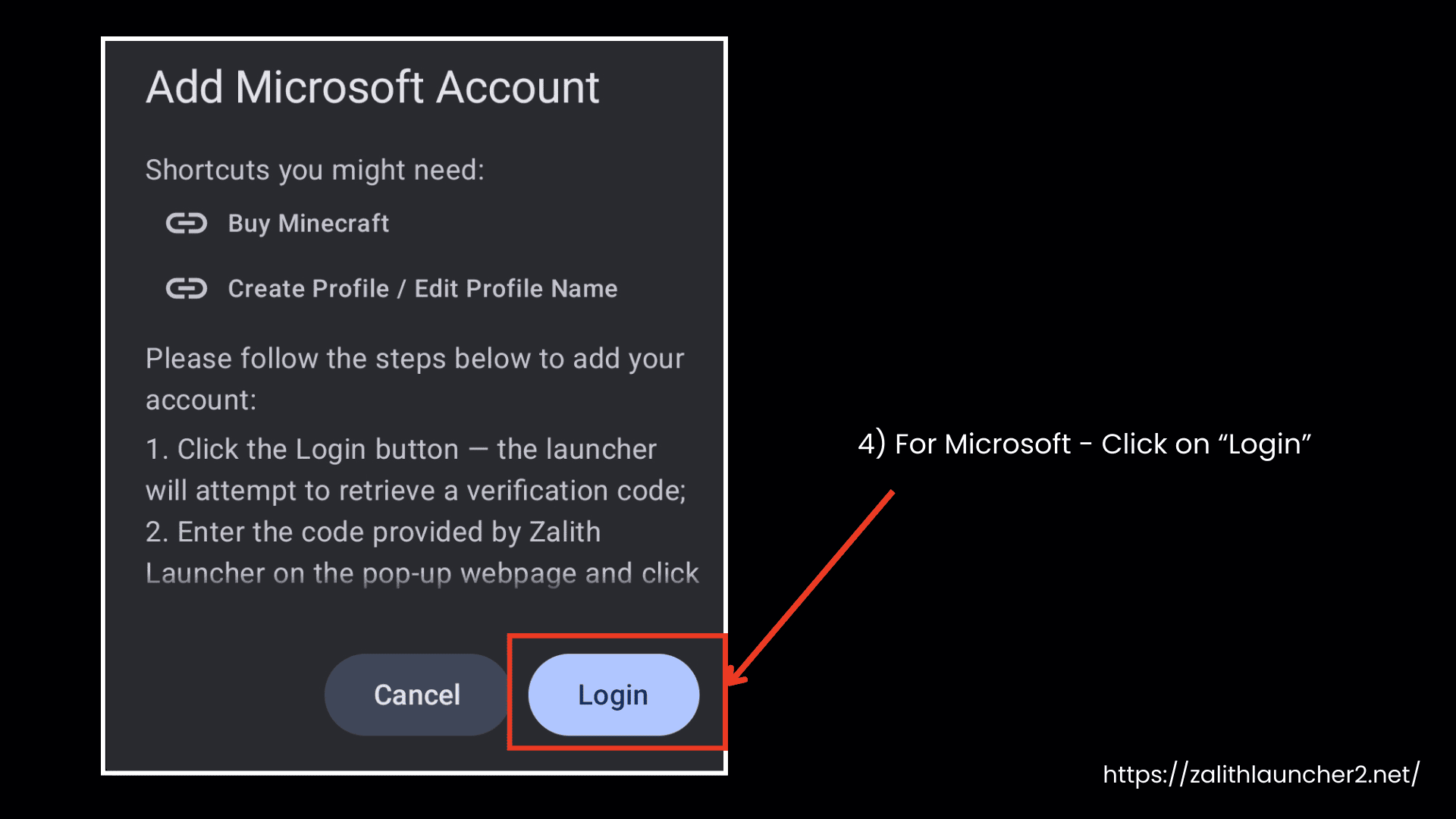
- Now, after the installation is done, you need to sign in to your Minecraft account. You can log in using your Microsoft account or play offline.
- The launcher will download the required runtime and game files automatically.
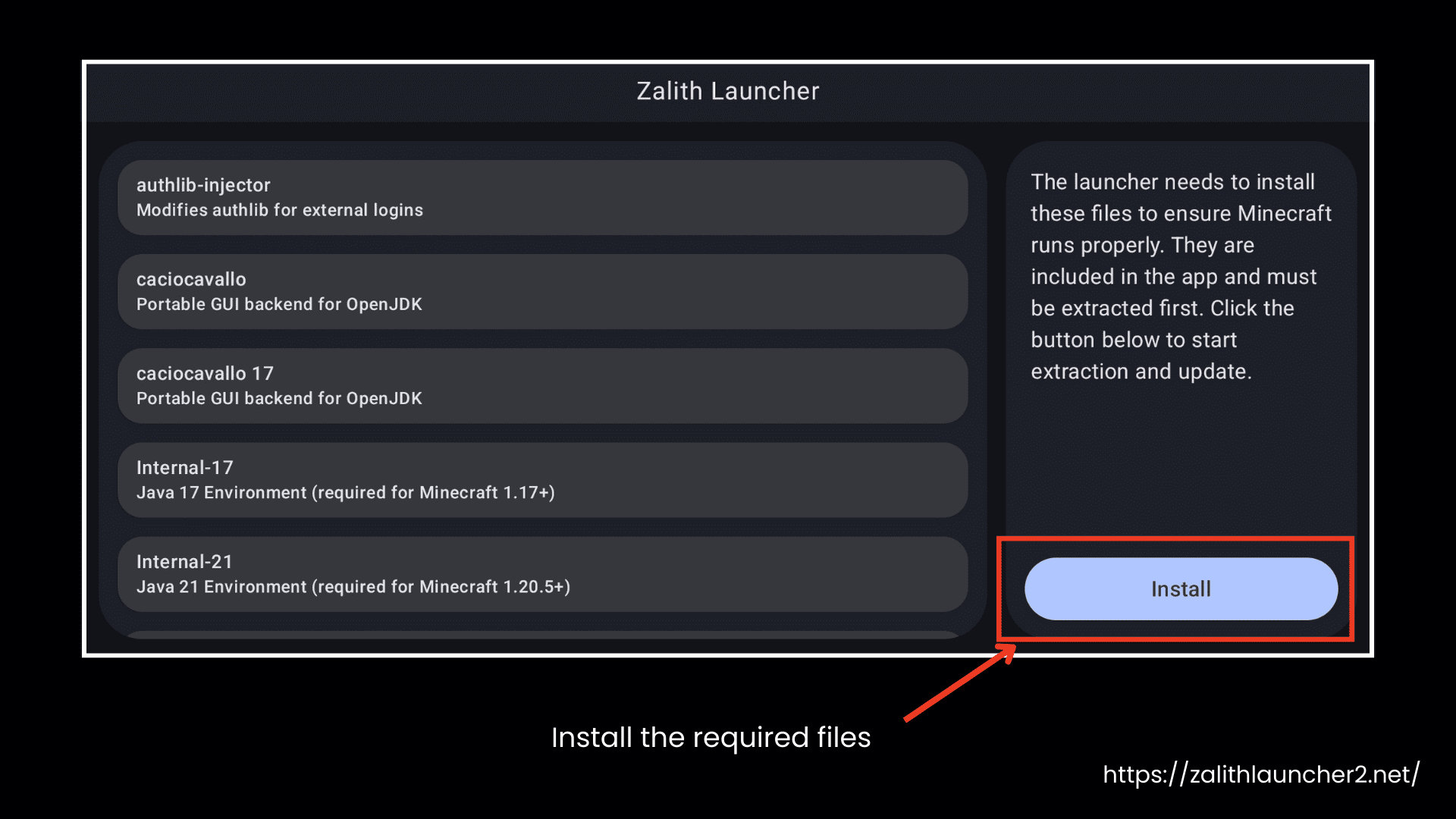
- Choose your preferred game directory location.
- Configure the basic settings according to your preferences.
How to Use Zalith Launcher 2? [Getting Started]
You can play Minecraft Java Edition on Android with Zalith Launcher 2. It gives full support to Shades, Fabric mods, and performance tools, for example: Sodium and Distant Horizons. Let’s discuss in detail how to use Zalith Launcher 2 step by step.
Install and Open the App
- Install the APK and open Zalith Launcher 2 on your Android device.
- Make sure your device supports OpenGL ES 3.2 or Vulkan for proper rendering.
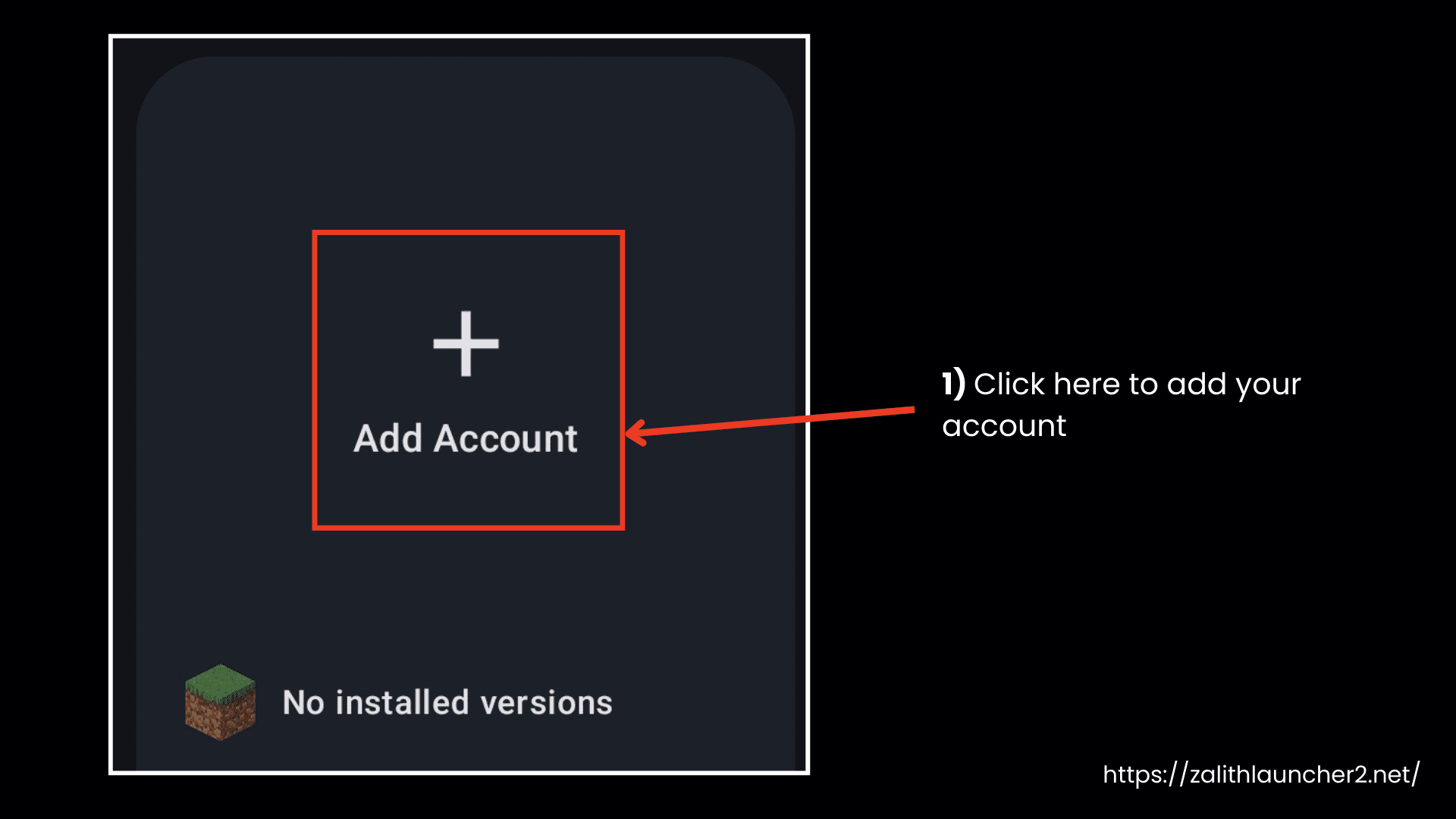
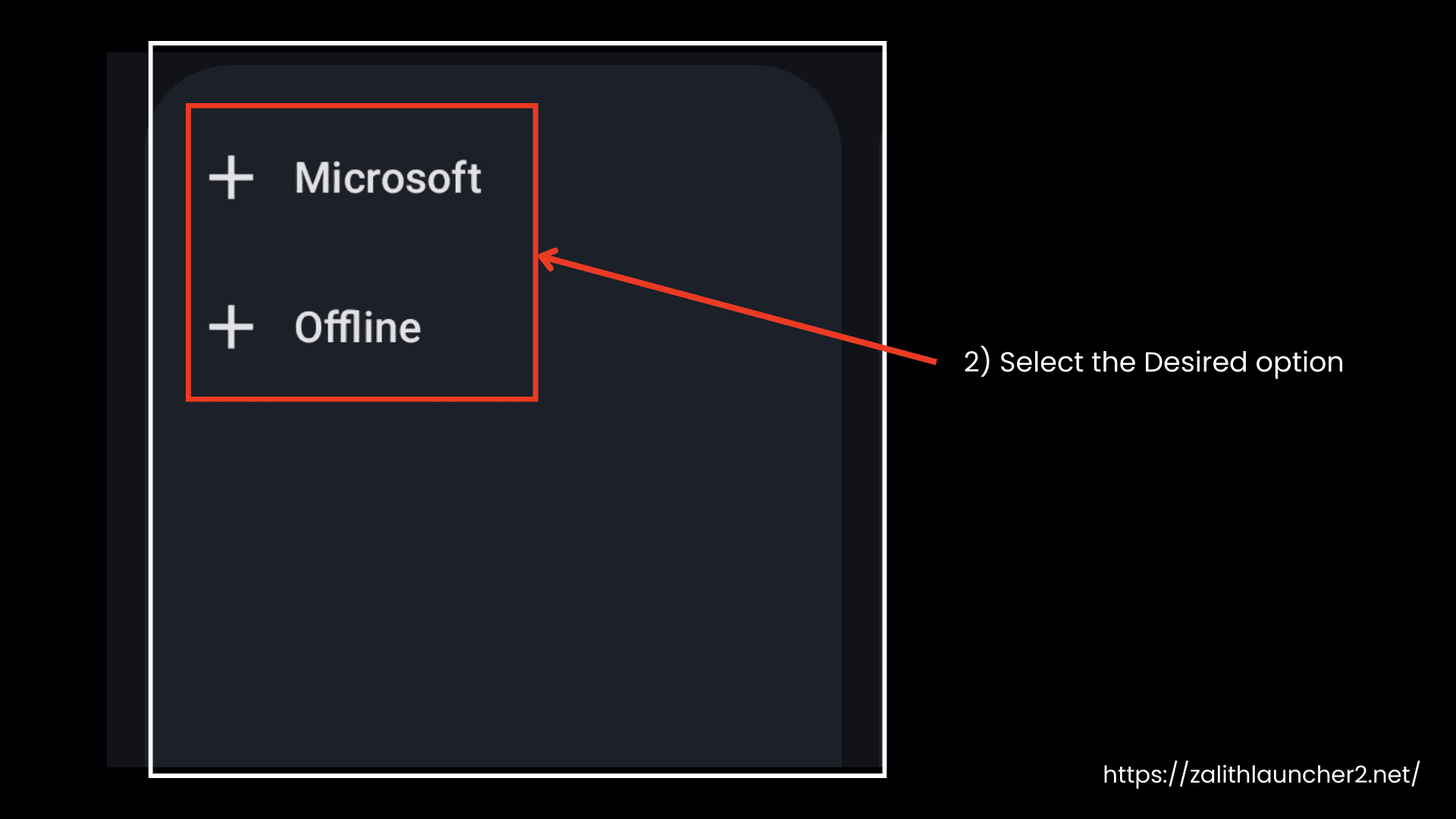
Sign In
- Log in using your Microsoft account (for official gameplay) or choose Offline Mode.
Select Game Version
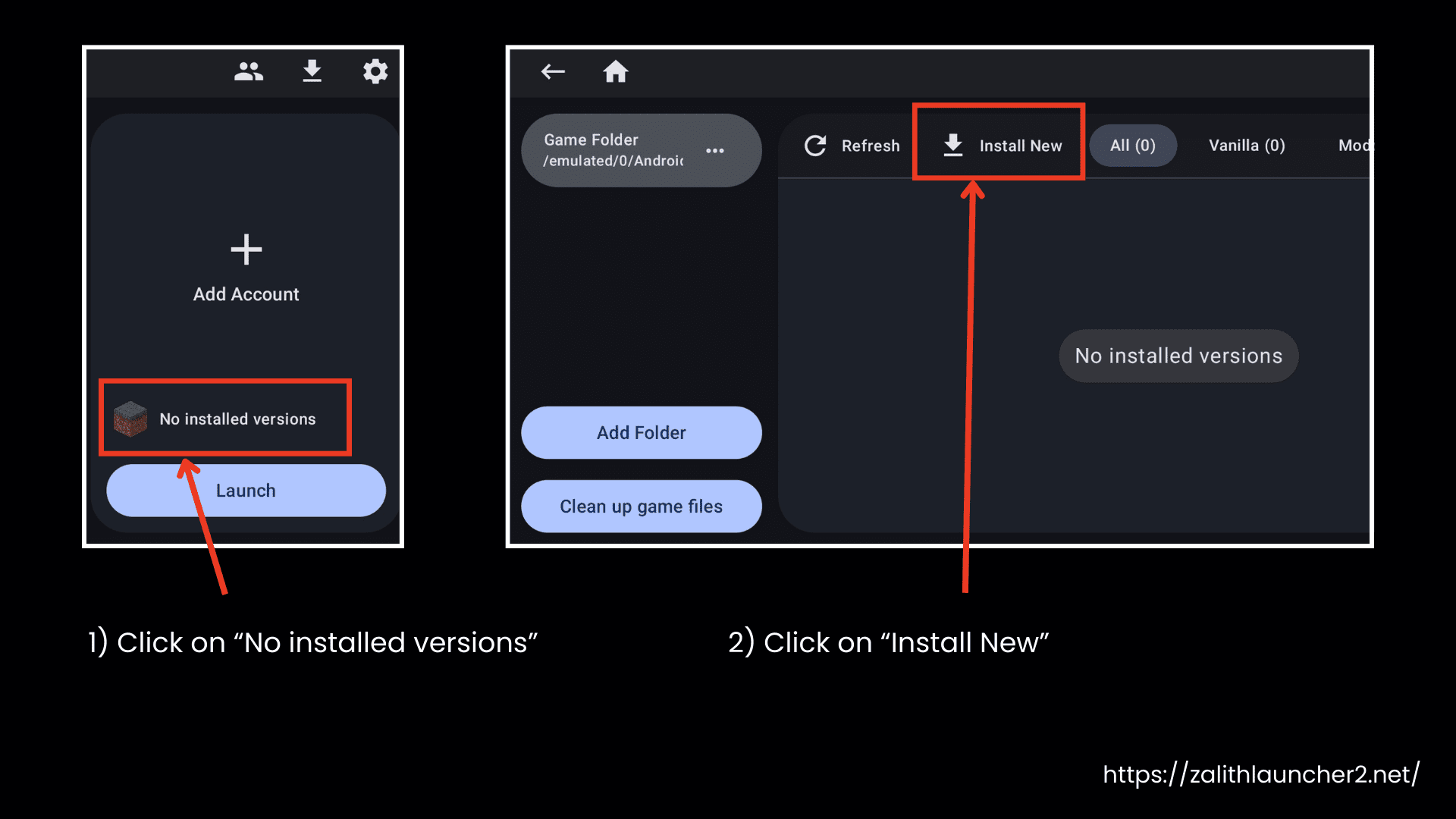
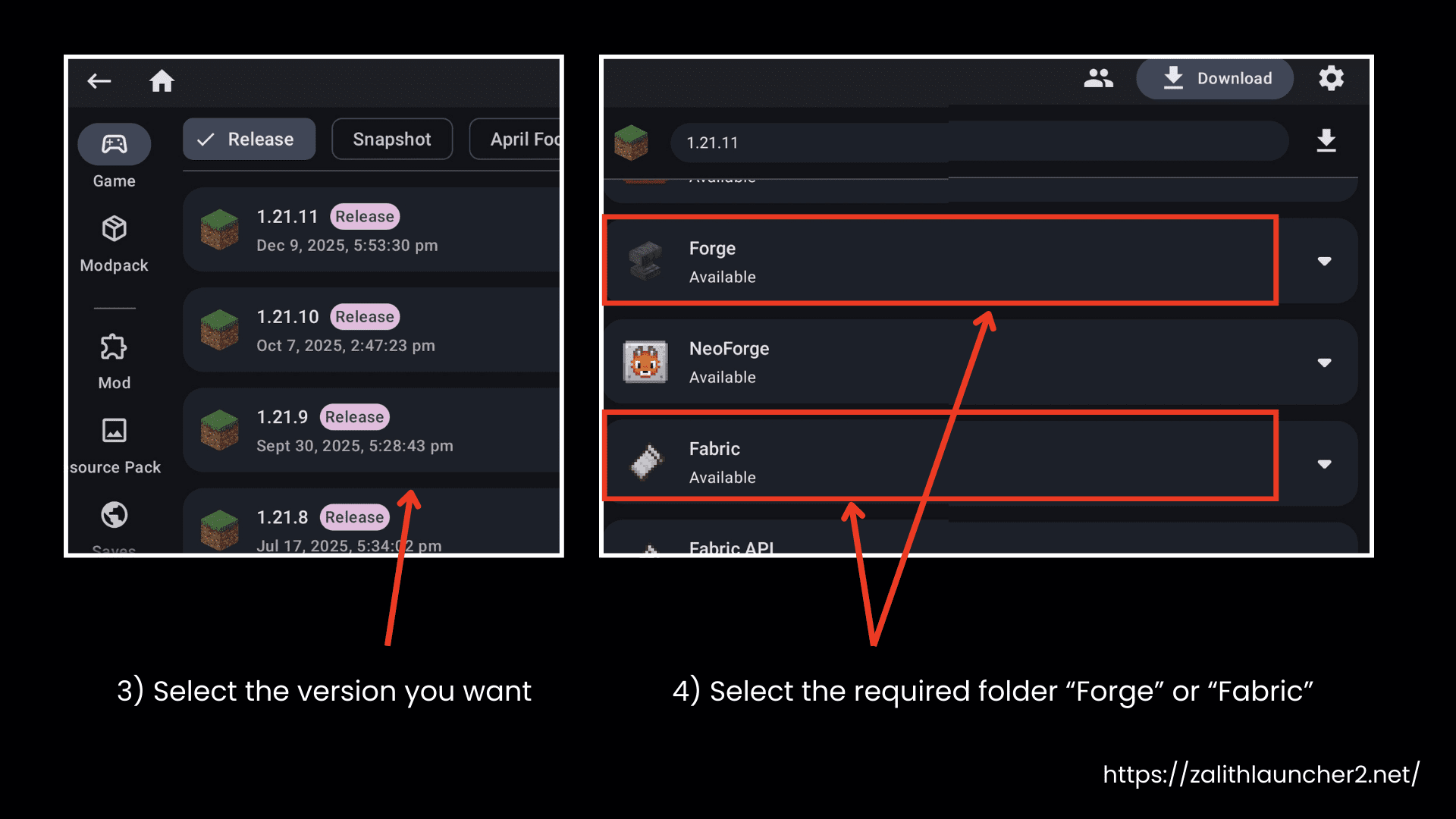
- Open Versions, choose the Minecraft Java version you want, and select the required loader (Fabric/Forge if needed).
Download Required Files
- Tap Play once. The launcher will automatically download the required runtime and game files.
- Minecraft 1.18 → 1.20.4 → Requires Java 17 runtime
- Minecraft 1.20.5 and newer → Requires Java 21 runtime
Configure Settings
- Go to Settings and adjust:
- RAM allocation
- Controls layout
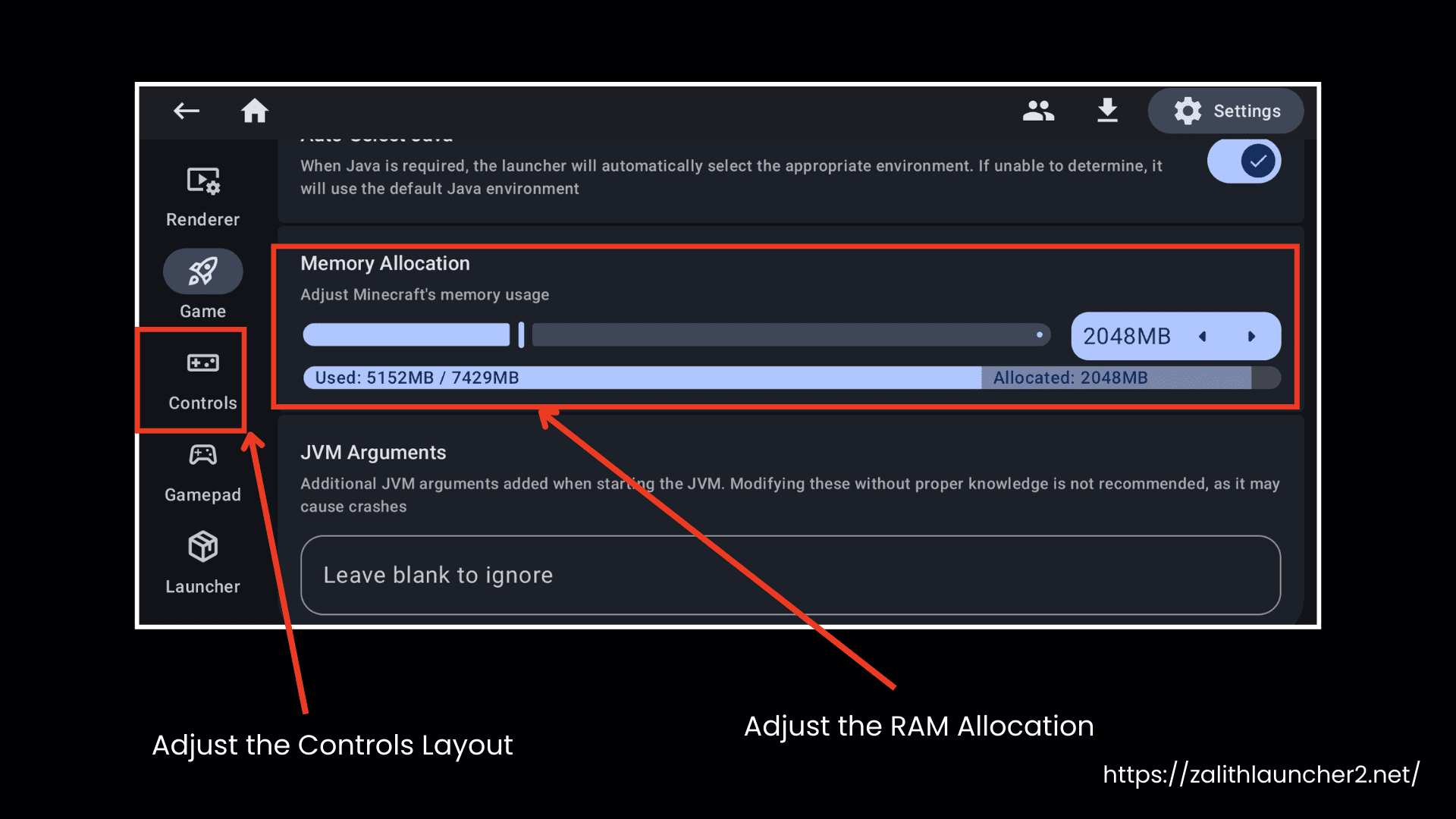
- Graphics and performance options
- Game directory (optional)
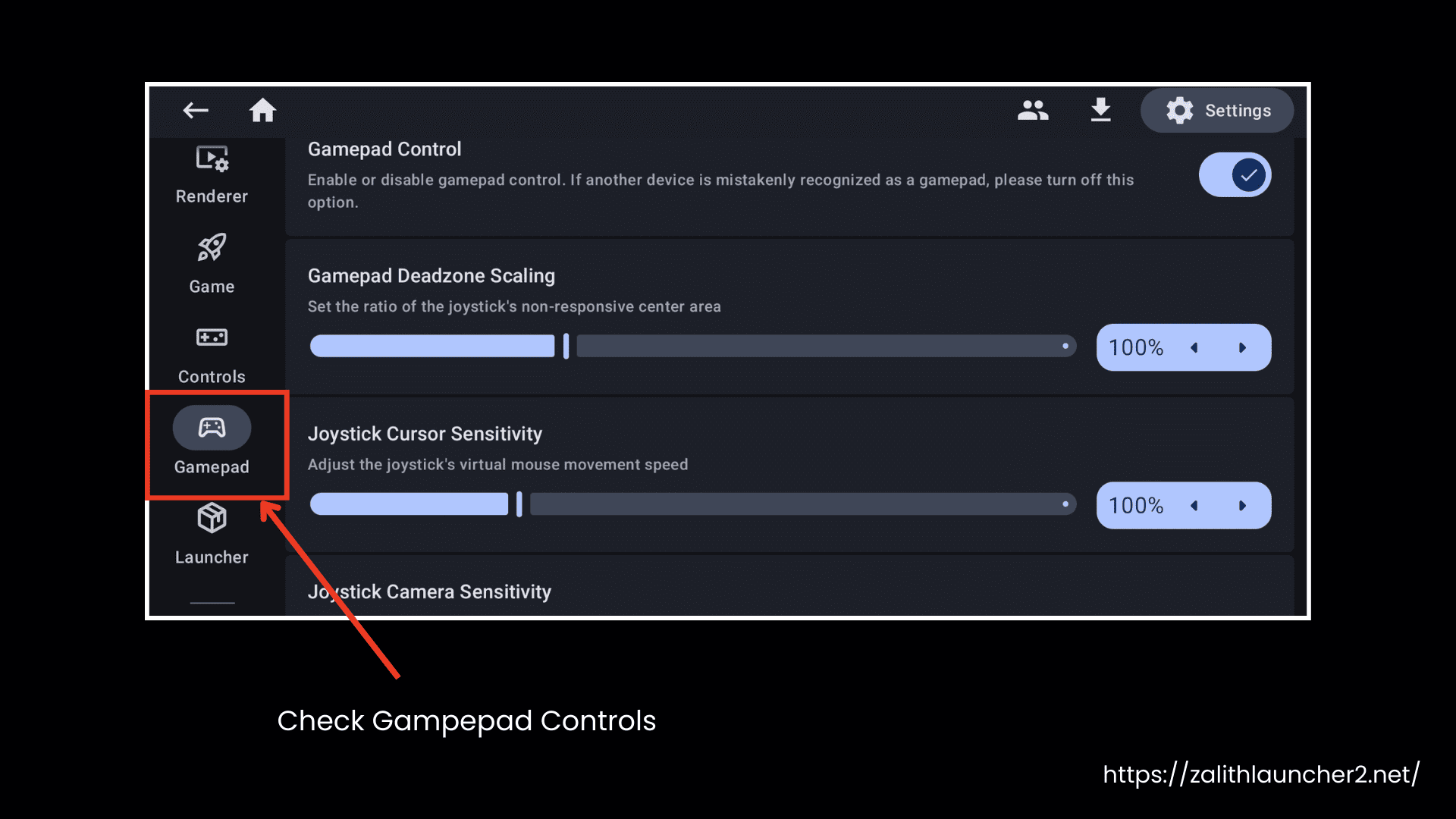
After this, you need to download the required Mods and Shaders.
Downloading Mods (Sodium, Shaders, Distant Horizons)
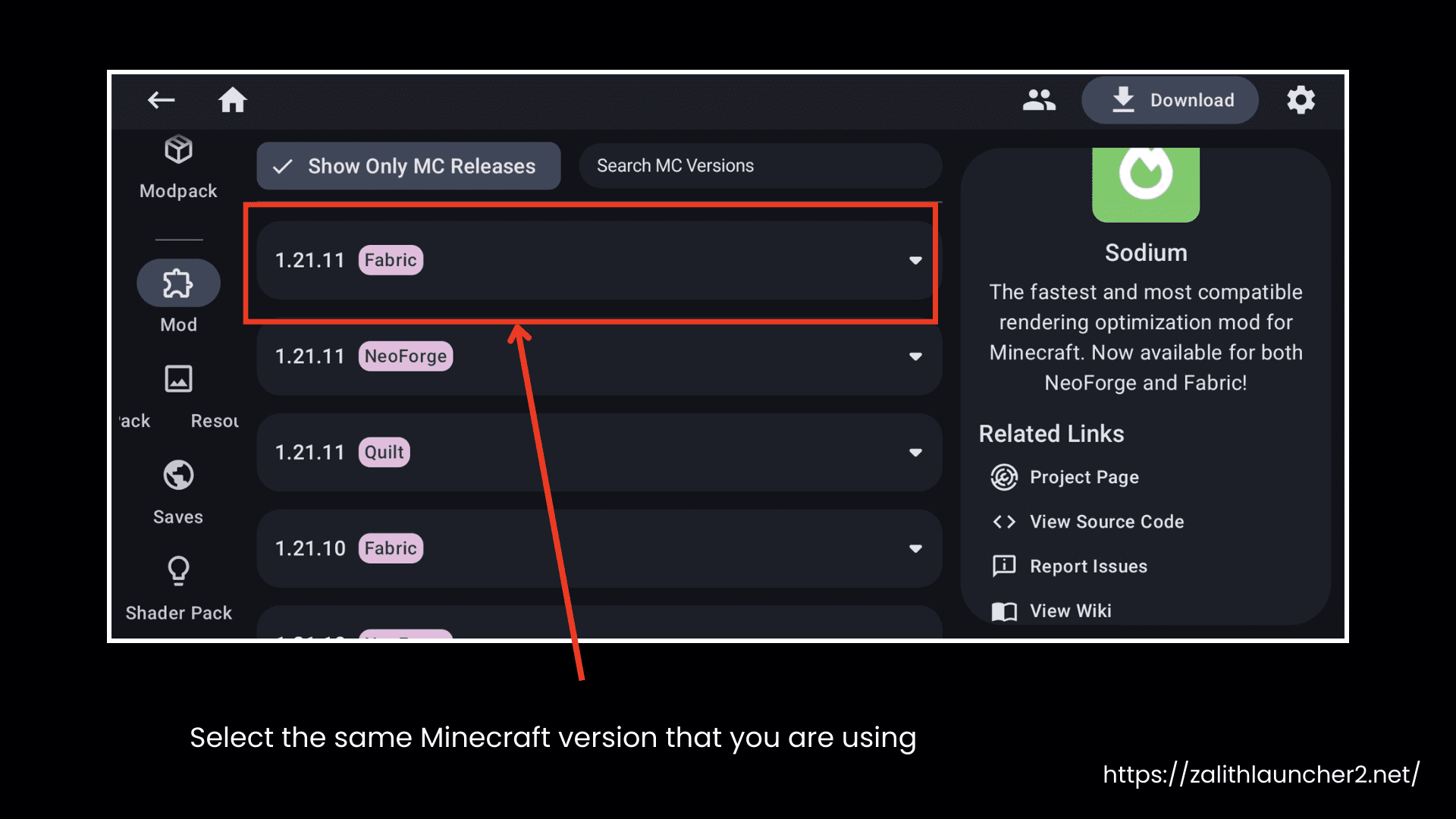
- Open the Mods download section.
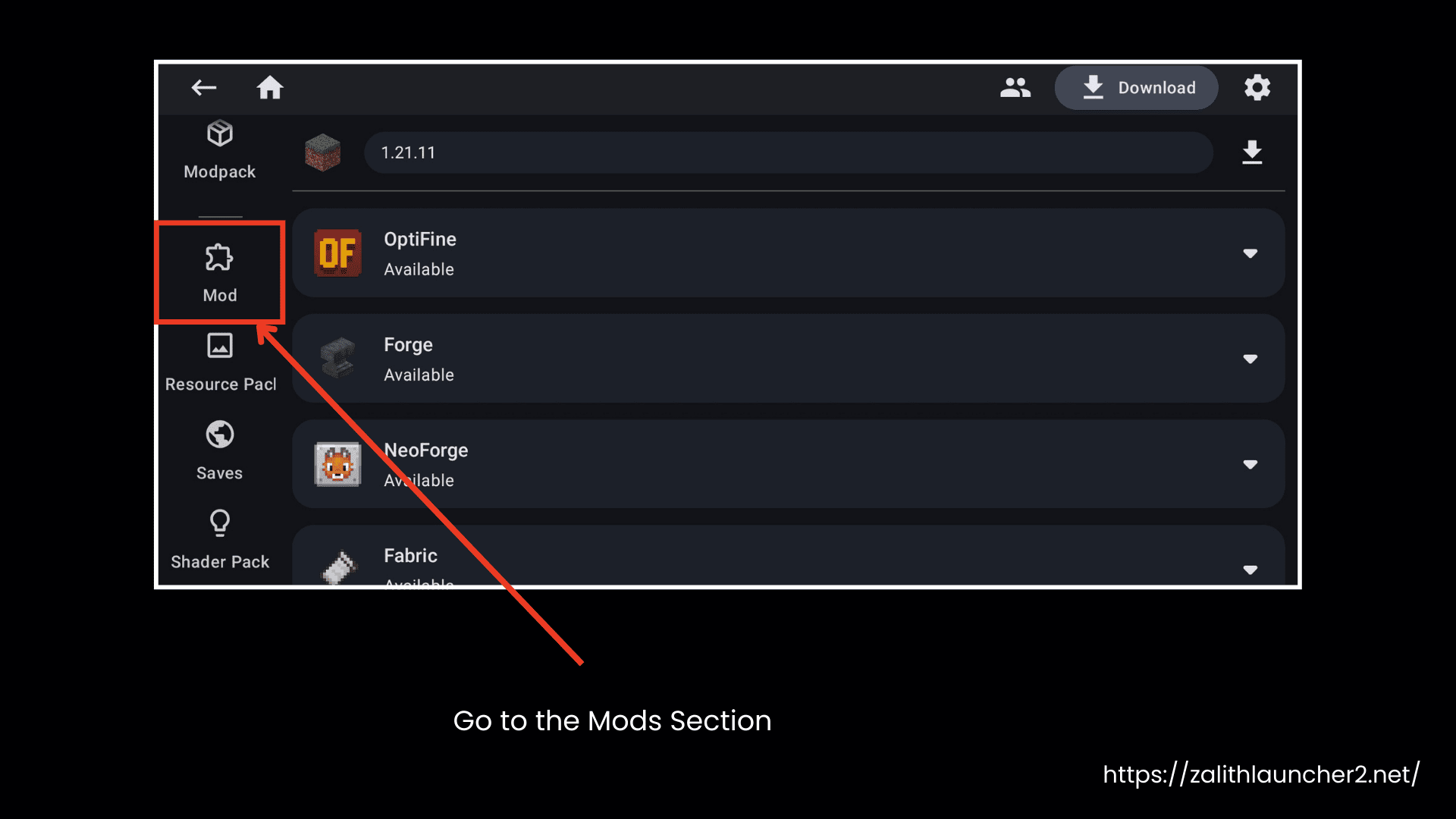
- Make sure to always select the same Minecraft version you are using (like 1.21.8).
- Download Sodium.
- Download Iris Shaders.
- Search for and download Distant Horizons.
- Make sure to download the Fabric version for compatibility.
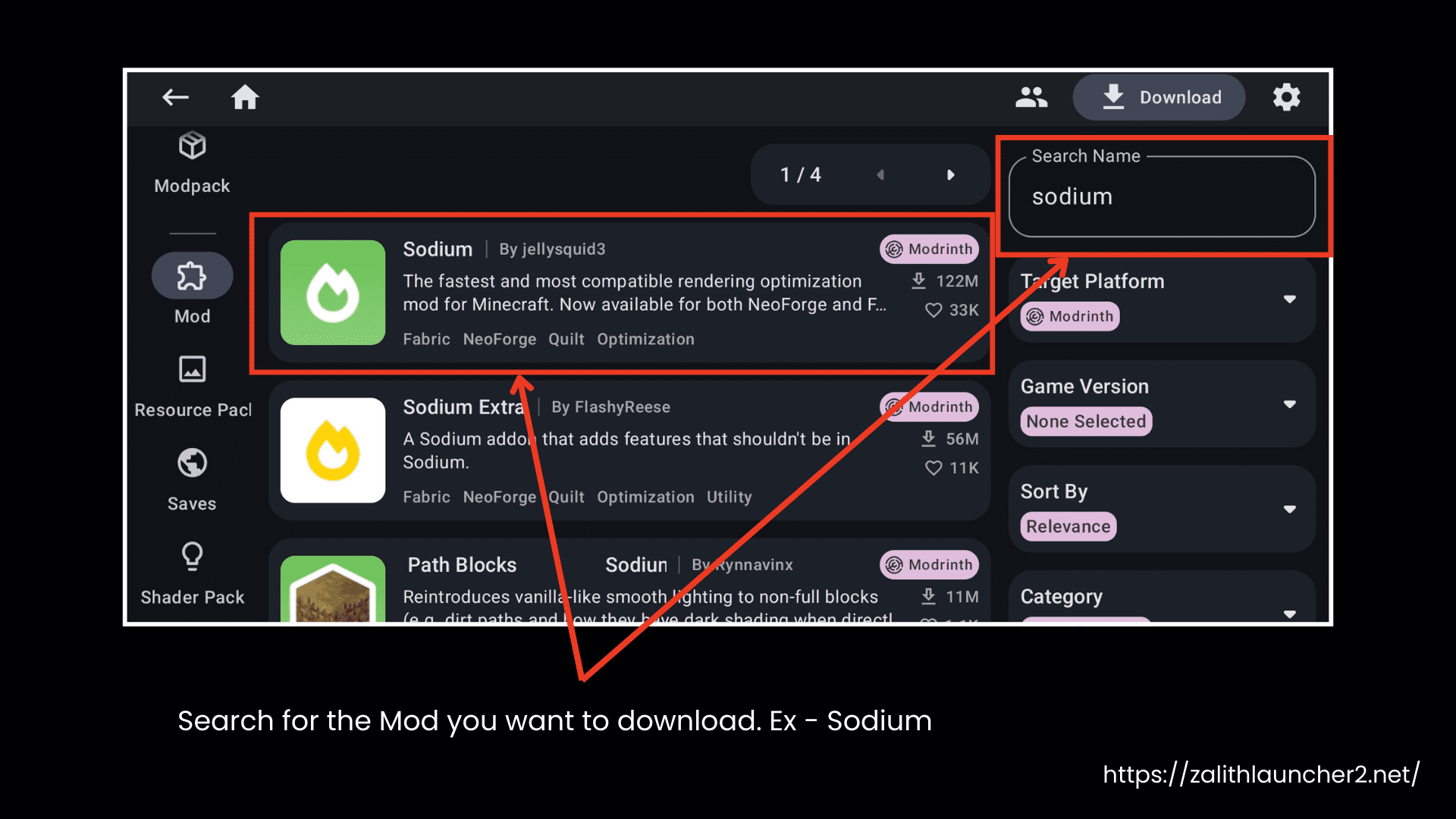
Downloading Shaders
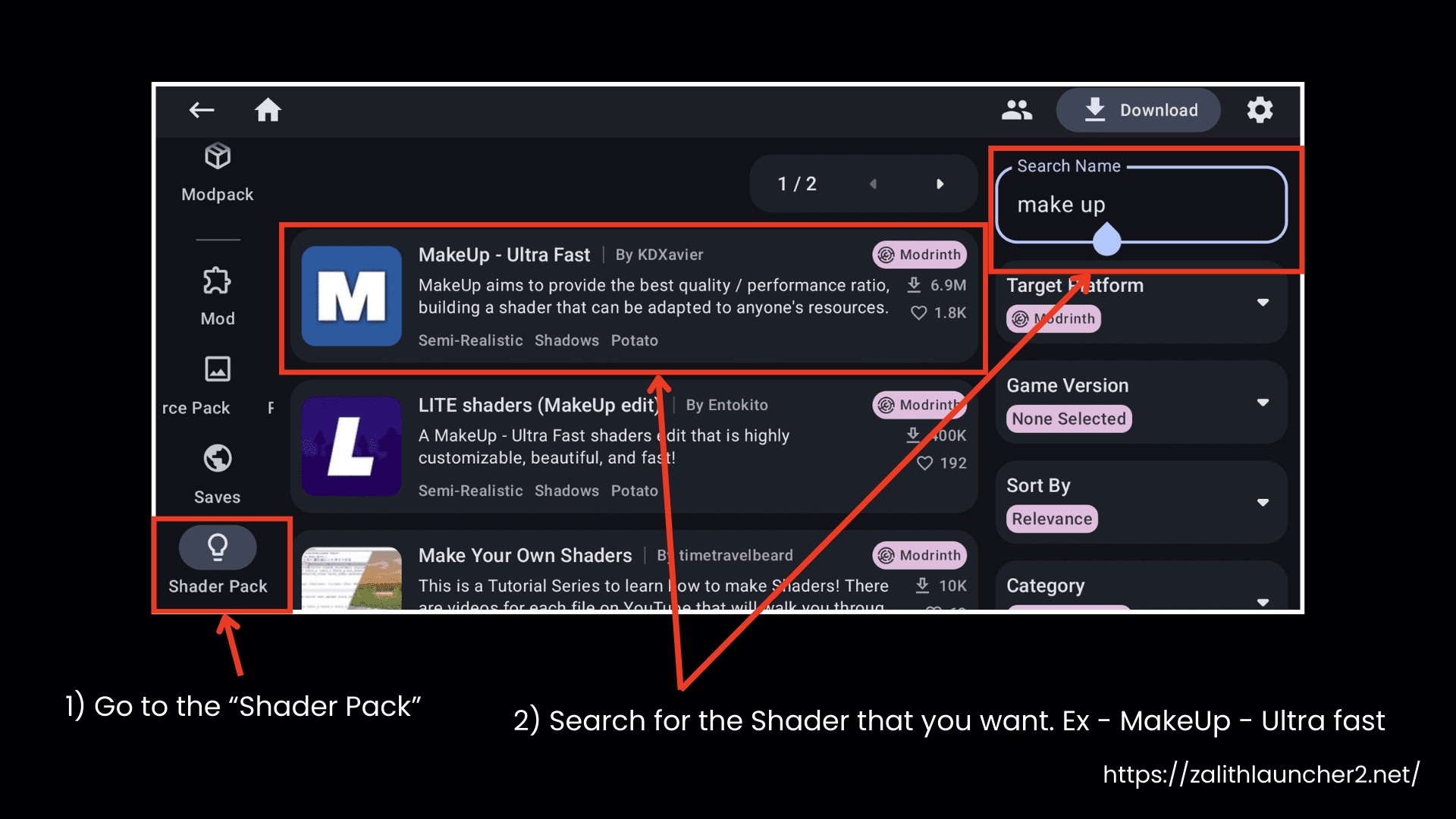
- Download MakeUp Ultra Fast Shaders.
- Download Complementary Shaders.
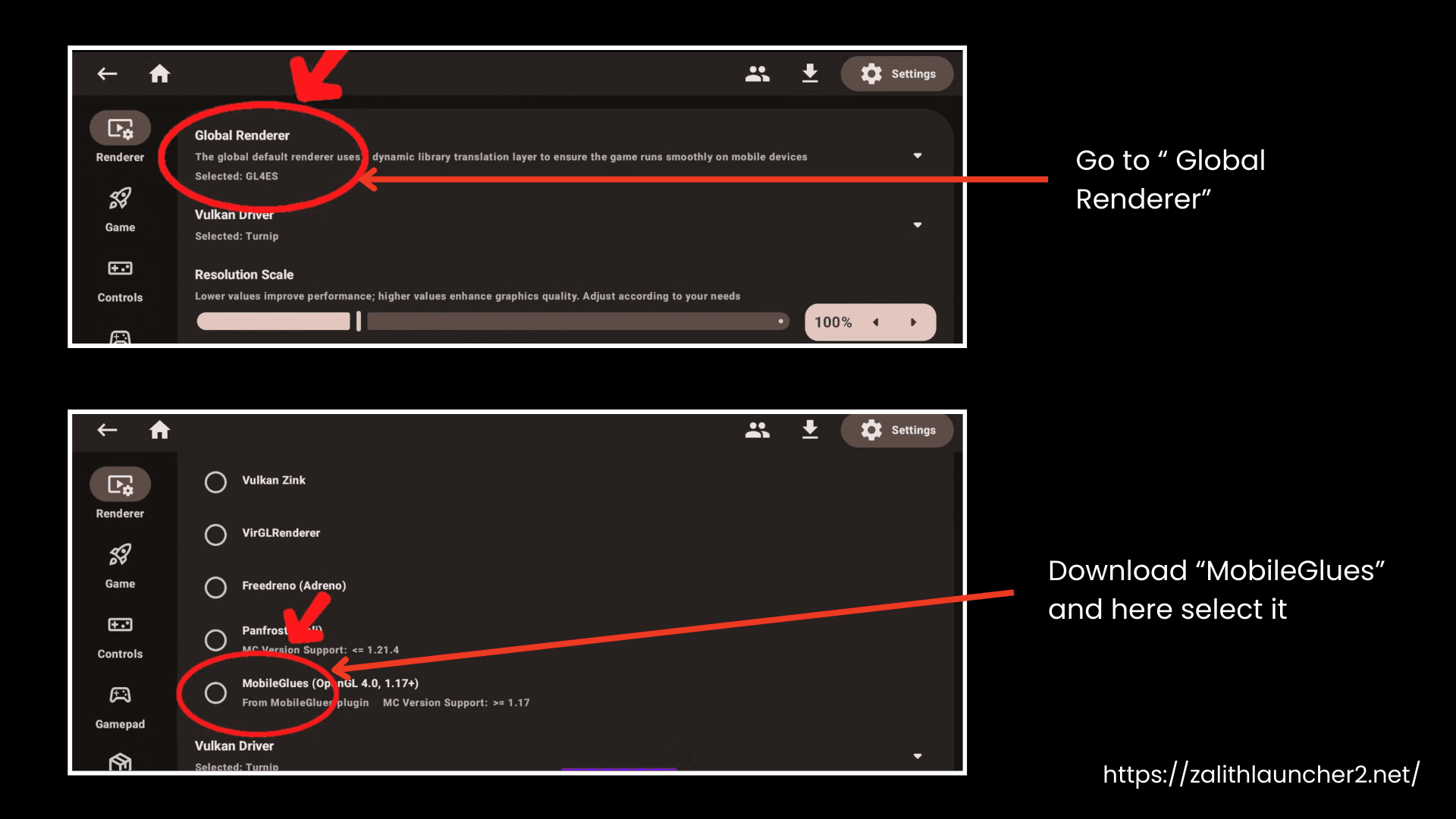
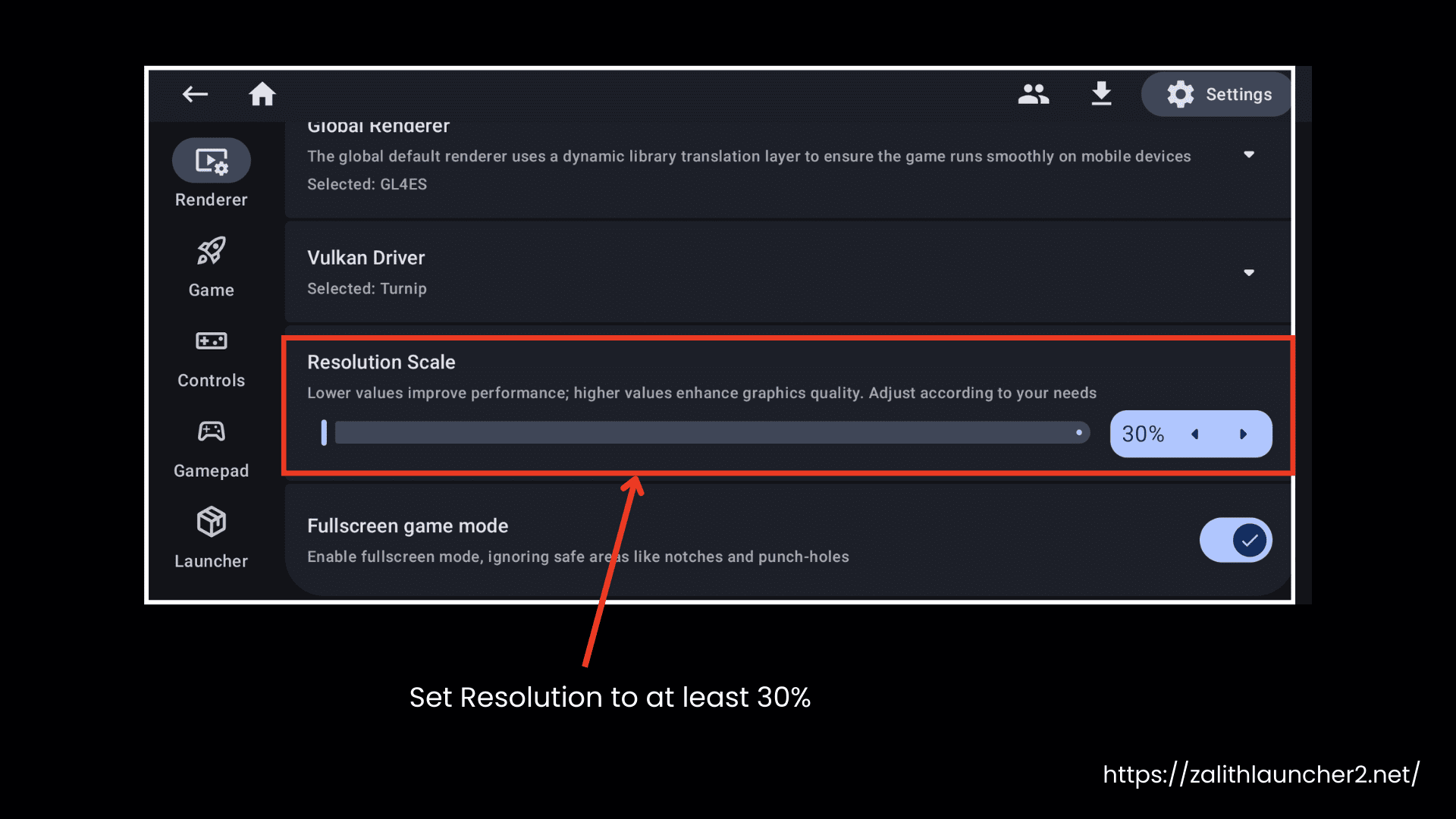
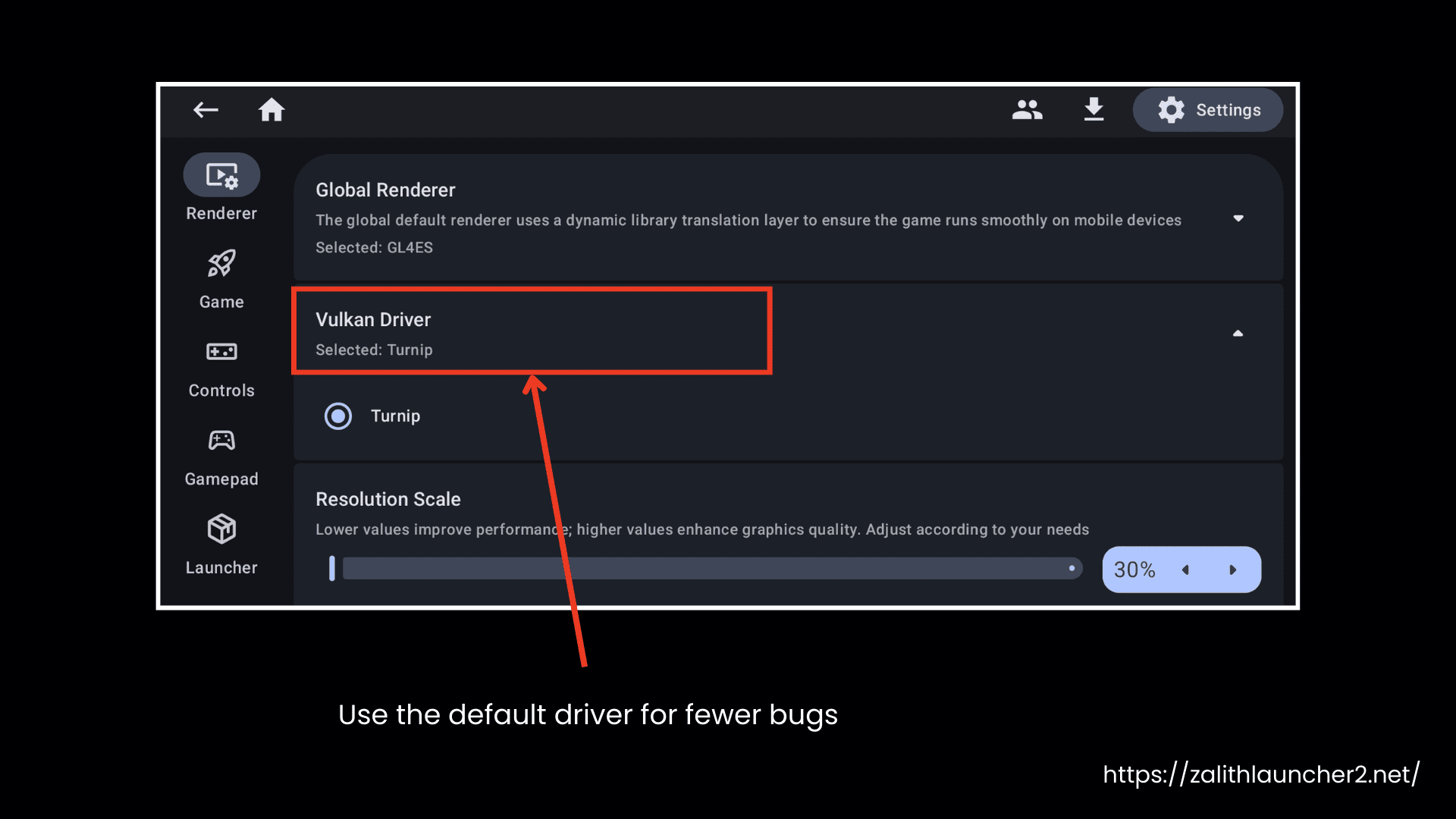
Renderer & Resolution Settings
- Set Resolution to at least 30%
- Set Renderer to Mobile GLES Renderer
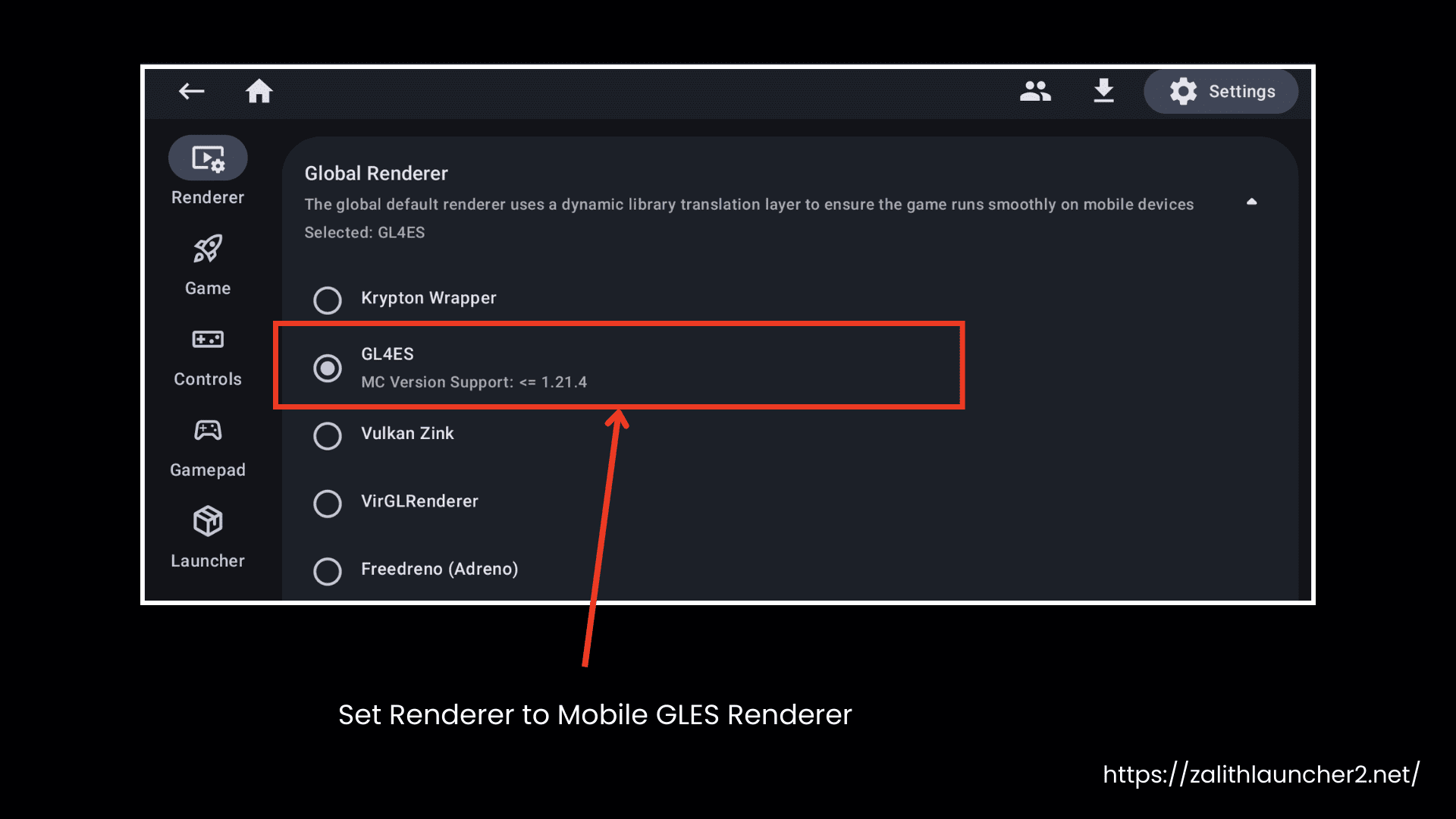
- Try other renderers only if this one doesn’t work
- Use the default driver for fewer bugs
Launching the Game & In-Game Settings
- Launch the game
- Use the mouse and keyboard if the old controls can’t be imported
- Set GUI Scale to 1x
Shader & Distant Horizons Settings
- Try Complementary Unbound first
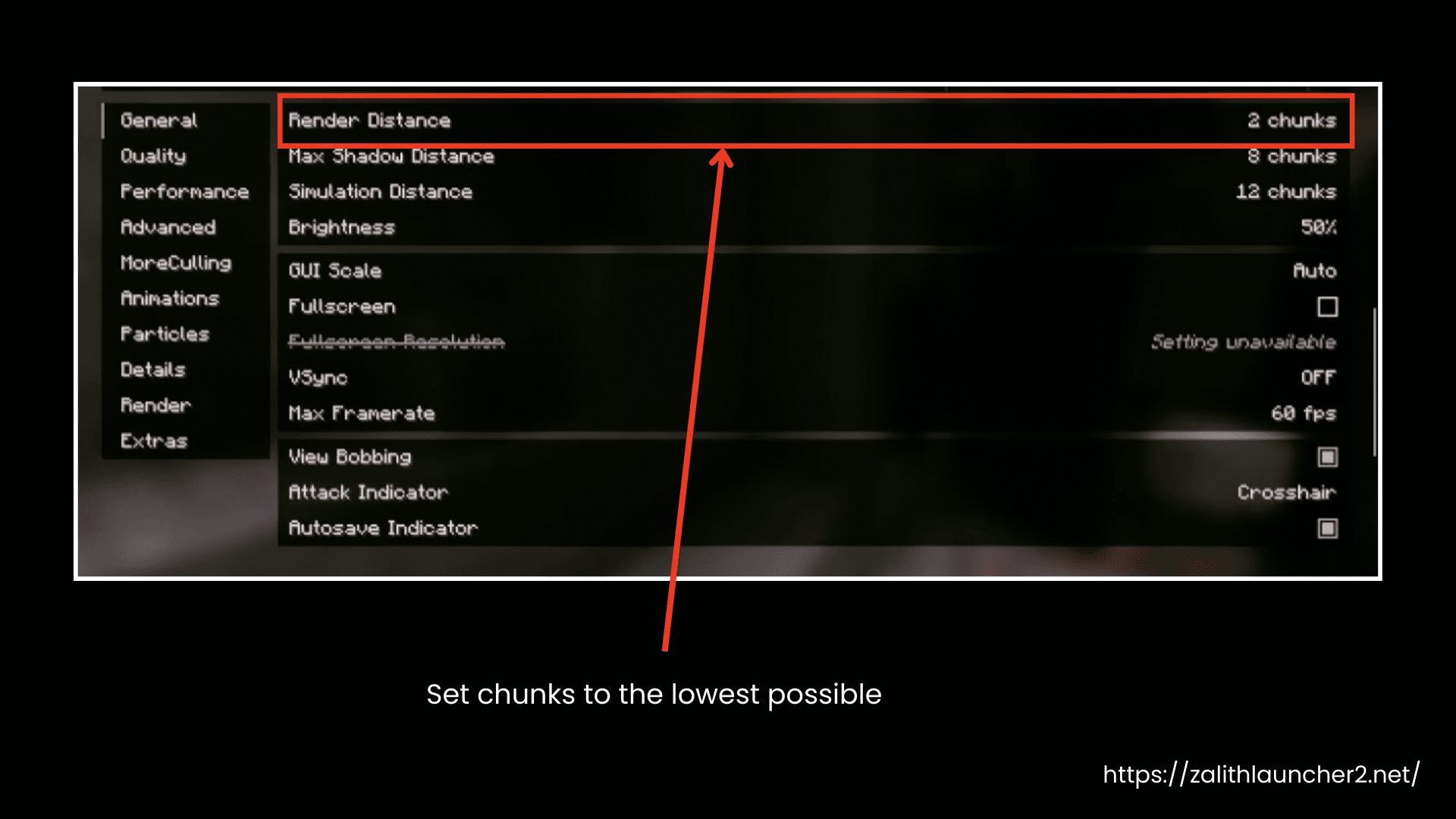
- Set Render Distance to 6-12 chunks (depend on your mobile device)
- For Distant Horizons:
- Set chunks to the lowest possible
- Let Distant Horizons handle far rendering to avoid FPS drops
Performance Test
- Try MakeUp Ultra Fast Shader
- It is very light and runs fast
Launch the Game
- Return to the main screen and tap Play to start Minecraft Java Edition.
Zalith Launcher 2 Controls
Features in Detail
Advanced Control Layout Editor
You get advanced-level customization options and in-game touch controls with Zalith Launcher 2. Moving or resizing buttons is also possible. Moreover their functions can be adjusted, or their capacity can be changed. You can create multiple layouts for different situations. These layouts can be tested before saving. Another interesting thing is that if you connect a gamepad or a mouse, the launcher automatically hides mobile controls.
Complete Mod Support
Zalith Launcher 2 works well with Minecraft mod loaders like Forge, NeoForge, Fabric, and Quilt. You can manage mods and check their compatibility, and do batch updates as well. Installation is very easy, as you just need to drag and drop, and each mod is placed in the correct folder.
Multi-Renderer System
This launcher supports multiple renderers to improve graphics and performance on different Android devices. It helps optimize CPU and memory usage, and you can switch renderers without reinstalling Minecraft. It can also suggest the most suitable renderer based on your device.
Built-in Resource Manager
Zalith Launcher 2 resource manager downloads and manages mods, resource packs, shaders, and world saves directly. It handles compatibility issues and dependencies, and allows you to do batch operations like enabling, disabling, or deleting multiple files.
Gamepad Support with Custom Remapping
This launcher works with Xbox, PlayStation, and other Bluetooth controllers. You can adjust stick sensitivity, dead zones, and buttons for different playstyles. If you prefer touch controls, you can disable gamepad support completely.
Customizable Visuals
You can change backgrounds with different images or videos. You can also switch between light and dark modes and choose accent colors as you like. The launcher uses Material Design 3, which gives a polished appearance and makes the interface more appealing.
Why Choose Zalith Launcher 2?
Zalith Launcher 2 is a game-changer with its amazing features. It has been built on Jetpack Compose that’s why it provides smooth performance. Android players can enjoy a desktop-quality Minecraft on their mobile screens with all customization options. The regular updates make it a smart choice to make your gameplay smoother.
| Feature |
Zalith Launcher 2 Best Choice |
PojavLauncher | Fold Craft Launcher (FCL) | MojoLauncher |
|---|---|---|---|---|
| User-Friendly UI | Very Easy | Moderate | Easy | Moderate |
| Built-in Mod Manager | Yes | No | Partial | Partial |
| Multi-Renderer Support | Yes | Limited | Limited | Limited |
| Java Runtime Handling | Built-in | Manual | Manual | Manual |
| Forge/Fabric/Quilt Support | Yes | Yes | Yes | Yes |
| Shader Support | Yes | Yes | Yes | Yes |
| Controller Support | Yes | Limited | Limited | Limited |
| Batch Mod Controls | Yes | No | Partial | Partial |
| Auto File Placement | Yes | No | Partial | Partial |
| Open Source | Yes | Yes | Yes | Yes |
| Android Optimization | High | High (Manual Setup) | Moderate | Moderate |
FAQs
Yes, Yes, Zalith Launcher 2 is an open-source launcher hosted on the Zalith Launcher 2 GitHub, so the code is open to check. Thousands of players trust that it is free of malware.
Also, you can test the downloaded ZIP file on VirusTotal to make sure it is fully secure.
You should always download the Zalith Launcher 2 APK from a trustworthy source. This APK is not available on the Google Play Store, but you can download it from our website.
Yes, it is open-source software under the GPL-3.0 license and is completely free. You do not have to pay any charges to download it or after installation.
For Android players, we recommend Zalith Launcher 2 APK latest version as the best choice because it allows in-game controls, gamepad support, and automatic mod updates. You can enjoy a full Java Edition experience on your mobile screen.
Final Words
Zalith Launcher 2 APK is one of the popular Minecraft Java Edition launchers for Android, offering a user-friendly design and multiple features. You can download and install this APK easily, and it supports major mod loaders like Forge, Fabric, Quilt, and NeoForge. The customizable in-game controls allow you to adjust the layout and enjoy gameplay according to your preference. The modern Material Design 3 interface provides a clean and polished experience on mobile devices. You can also join the Zalith Launcher 2 Discord community to connect with other players and share tips. Download the app from our website now and enjoy!